
nmcli - network manager command line interface - how to
Are you looking for a command line way of doing another typical graphical task? Well, here it is. Network Manager is very well known in Linux as the GUI tool for wireless network management. Originally developed by Redhat.
But, it also have a cli sibling that I like even better. Just because of the simple fact that when I have set it all up, I just need to search in my bash history or remember nmcli connection up xxx, with help of autocomplete, to reconnect. Since network manager also supports dbus, it also works with my home made dwm status bar 😃
Anyhow, if you want the full documentation go to the official gnome page here. I will write briefly on some of my favorite useful commands. And hey, network manager works for wired connections as well.
Wireless
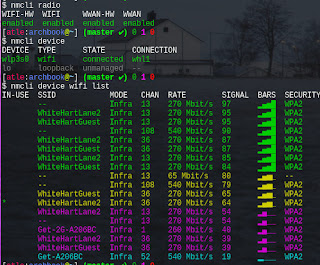
Check if wifi is enabled
nmcli radioWill respond like this if it's ok
WIFI-HW  WIFI     WWAN-HW  WWAN
enabled  enabled  enabled  enabled
List devices to see wifi device name
nmcli deviceWill respond something like this
DEVICE  TYPE      STATE         CONNECTION
wlp3s0  wifi      disconnected  --
lo      loopback  unmanaged     --
So wlp3s0 is the device name that we will use later
List all wifi networks available
nmcli device wifi rescan
nmcli device wifi list
Simple connect to wifi network
This option does not save the connection for later
nmcli device wifi connect MyVisibleSSID password MySuperSecretPasswordCreate a saved connection
This will save a connection that you can connect to later without prompting the password each time
This will also work if you have hidden SSID
nmcli connection add type wifi con-name con1 ifname wlp3s0 ssid "MyHiddenOrNotSSID"
nmcli connection modify con1 wifi-sec.key-mgmt wpa-psk
nmcli connection modify con1 wifi-sec.psk "MySuperSecretPassword"
Connect to a saved connection
nmcli connection up con1